Disclosure: As an Amazon Associate, HomeTestBench earns from qualifying purchases.
🏆 Quick Verdict
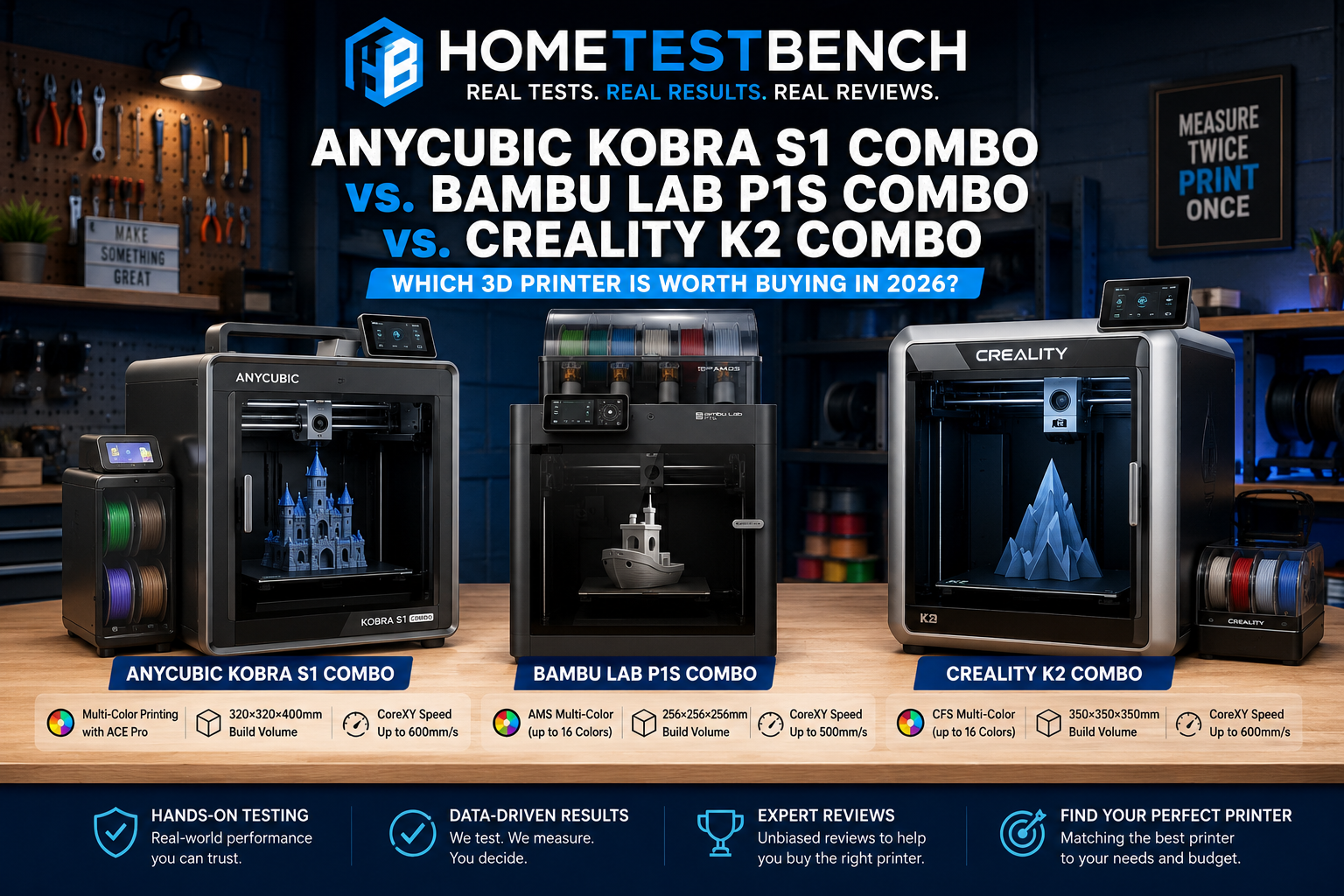
After comparing build quality, print speed, software, ease of use, and overall value, the Bambu Lab P1S Combo earns our Editor’s Choice for most users. The Anycubic Kobra S1 Combo is an excellent value with a larger build volume, while the Creality K2 Combo is the best option for makers who need a larger print area and advanced multi-color capabilities.
Table of Contents
Anycubic Kobra S1 Combo vs Bambu Lab P1S Combo vs Creality K2 Combo: Key Differences
| Feature | Anycubic Kobra S1 Combo | Bambu Lab P1S Combo | Creality K2 Combo |
|---|---|---|---|
| Overall Rating | 4.5/5 | 4.8/5 | 4.6/5 |
| Build Volume | 250 x 250 x 250 mm | 256 x 256 x 256 mm | 350 x 350 x 350 mm |
| Max Print Speed | 600 mm/s | 500 mm/s | 600 mm/s |
| Enclosed | Yes | Yes | Yes |
| Multi-color Printing | Yes | Yes (AMS) | Yes (CFS) |
| Auto Bed Leveling | Yes | Yes | Yes |
| Best For | Best Value | Best Overall | Large Prints |
| Ease of Use | 4/5 | 5/5 | 4/5 |
| Print Quality | 4/5 | 5/5 | 4/5 |
| Value | 5/5 | 4/5 | 4/5 |
| Editor’s Choice | Runner-Up | Winner | Best Large Format |
Which 3D Printer Is Right for You?
🏆 Best Overall
Bambu Lab P1S Combo
Best for:
✓ Beginners
✓ Reliability
✓ Excellent software
⭐⭐⭐⭐⭐ 4.8/5
💰 Best Value
Anycubic Kobra S1 Combo
Best for:
✓ Budget-conscious buyers
✓ Fast printing
✓ Great feature set
⭐⭐⭐⭐☆ 4.5/5
📦 Largest Build Volume
Creality K2 Combo
Best for:
✓ Cosplay
✓ Helmets
✓ Large functional parts
⭐⭐⭐⭐⭐ 4.6/5
Pros and Cons
✅ Pros
- Fast print speeds
- Strong print quality across all three models
- Enclosed designs support a wider range of materials
- Multi-color printing options available
❌ Cons
- Multi-color systems add cost and complexity
- Larger machines require more workspace
- Software experience varies considerably between brands
- Best choice depends heavily on build-size needs and budget
Print Quality
All three printers are capable of producing excellent prints, but the Bambu Lab P1S Combo has the edge when consistency and ease of getting a great result are the priorities. Its mature hardware and software ecosystem makes it particularly good at producing reliable results without requiring much adjustment from the user.
The Anycubic Kobra S1 Combo also delivers very good print quality and competes closely with the Bambu, especially considering its value. The Creality K2 Combo is similarly capable of excellent results, with its larger build volume becoming a major advantage when printing bigger models that would need to be split into multiple pieces on the other two machines.
For most users, the differences in raw print quality are smaller than the differences in usability, build volume, software, and price. All three can produce impressive prints when properly configured.
Speed and Performance
Speed is a major selling point for all three printers, but advertised maximum speeds don’t tell the whole story. The Anycubic Kobra S1 Combo and Creality K2 Combo are rated for print speeds up to 600 mm/s, while the Bambu Lab P1S Combo is rated up to 500 mm/s. In everyday printing, however, actual speed depends on the model, material, layer height, acceleration settings, and the level of print quality you’re trying to achieve.
The Bambu Lab P1S Combo stands out for its balance of speed, consistency, and reliability. Rather than simply chasing the highest maximum speed, it delivers a polished printing experience that makes fast printing accessible without requiring extensive tuning.
The Anycubic Kobra S1 Combo is particularly impressive considering its price, offering high-speed printing that makes it a strong value for users who want good performance without stepping up to a more expensive machine. The Creality K2 Combo combines similarly high advertised speeds with its much larger build volume, making it especially appealing when you need to produce large parts or batches of smaller parts efficiently.
Bottom line: Don’t choose between these three printers based on the 500 mm/s versus 600 mm/s specification alone. In real-world use, reliability, acceleration, slicer settings, material choice, and the complexity of the model can matter more than the maximum advertised print speed
Build Volume and Print Size
Build volume is one of the biggest differences between these three printers. The Anycubic Kobra S1 Combo provides a 250 × 250 × 250 mm build area, while the Bambu Lab P1S Combo offers a slightly larger 256 × 256 × 256 mm build volume. For most everyday projects, either provides plenty of room for functional parts, household items, toys, models, and other typical prints.
The Creality K2 Combo is in a different category with its much larger 350 × 350 × 350 mm build volume. That additional space can make a significant difference when printing helmets, cosplay pieces, large prototypes, organizers, signs, or other oversized projects. Models that might need to be divided into several pieces on the Anycubic or Bambu can potentially be printed as a single part on the K2.
A larger build volume isn’t automatically better, however. The printer itself takes up more space, larger prints consume more filament, and long prints increase the consequences of a failed job. If you rarely print oversized objects, the more compact build areas of the Kobra S1 and P1S may actually be more practical.
Bottom line: The Bambu Lab P1S Combo and Anycubic Kobra S1 Combo provide enough build space for most users. If large-format printing is an important part of what you plan to make, the Creality K2 Combo’s 350 mm build volume is a substantial advantage.
Multi-Color Printing
Since we’re comparing the Combo versions of all three printers, multi-color and multi-material printing is an important part of the buying decision. Each system allows you to automatically switch between filaments during a print, opening the door to multi-color models, labels, signs, decorative parts, and projects that would otherwise require manual filament changes.
The Bambu Lab P1S Combo uses Bambu Lab’s AMS (Automatic Material System), which is one of the most mature parts of the Bambu ecosystem. The close integration between the printer, AMS, Bambu Studio, and Bambu Handy helps make multi-color printing relatively approachable, even for users who haven’t worked with an automated filament system before.
The Anycubic Kobra S1 Combo uses Anycubic’s ACE Pro system and provides a compelling alternative, particularly for buyers focused on value. The Creality K2 Combo uses Creality’s CFS system and combines automated multi-color printing with the K2’s significantly larger build area, which can be particularly attractive for large decorative models, cosplay projects, and signs.
There is a tradeoff with all three systems: multi-color printing can substantially increase print time and filament waste because the printer must purge material when changing colors. The more color changes a model requires, the more noticeable that overhead can become.
Bottom line: If multi-color printing is a major priority, don’t judge these machines only by how many colors they can print. Software integration, filament handling, reliability, and the amount of waste generated during color changes are just as important. The P1S Combo’s mature AMS ecosystem gives it an advantage in overall refinement, while the Anycubic and Creality systems offer compelling alternatives depending on price and build-volume needs.
Considering a different approach to multicolor printing? Read our Snapmaker U1 review to see how its four-toolhead system compares with conventional multicolor printers.
Ease of Use & Software
Hardware specifications matter, but software and ease of use can have an even greater impact on the day-to-day experience of owning a 3D printer. All three machines include features designed to reduce setup and calibration work, but there are meaningful differences in how polished the overall experience feels.
The Bambu Lab P1S Combo has the advantage here. Bambu Studio, the Bambu Handy mobile app, and the printer’s integrated ecosystem make it relatively easy to go from downloading or designing a model to starting a print. Profiles for common materials and print settings are well developed, and the integration with the AMS makes multi-color projects easier to manage. This polished workflow is one of the biggest reasons the P1S remains such an appealing option for users who would rather spend their time printing than continually adjusting the machine.
The Anycubic Kobra S1 Combo provides a much more competitive user experience than its lower price might suggest. Its automated features remove much of the setup traditionally associated with 3D printing, making it an attractive choice for someone who wants modern capabilities while keeping cost under control.
The Creality K2 Combo also offers extensive automation and a modern software ecosystem. Its biggest attraction remains the combination of these features with its much larger build volume. However, buyers who prioritize the most refined overall software experience may still find the Bambu ecosystem easier to navigate.
Bottom line: The Bambu Lab P1S Combo gets our edge for ease of use and software integration. The Anycubic Kobra S1 Combo makes a strong case for buyers who want many of the same conveniences at a lower price, while the Creality K2 Combo makes the most sense when its larger build capability outweighs differences in software refinement.
Value for Money
Value isn’t simply about choosing the printer with the lowest price. It comes down to what you get for your money and whether you’re paying for features you’ll actually use. All three Combo packages include automated multi-color printing, enclosed designs, high-speed printing, and modern convenience features, but they target somewhat different buyers.
The Anycubic Kobra S1 Combo makes the strongest case for overall value. It delivers many of the capabilities buyers are looking for in a modern enclosed multi-color printer while typically competing aggressively on price. For someone who wants to enter this class of machine without spending more than necessary, the Kobra S1 Combo is particularly compelling.
The Bambu Lab P1S Combo may cost more, but part of that premium buys access to Bambu Lab’s mature ecosystem, polished software, reliable profiles, and well-integrated AMS. For users who place a high value on convenience and want to minimize tinkering, paying more for that experience can still represent excellent value.
The Creality K2 Combo has a different value proposition. Its 350 × 350 × 350 mm build volume gives you considerably more printing space than either of the other machines. If you regularly print large objects, that extra capacity may easily justify the additional cost. If you rarely need that space, however, you may be paying for capability you won’t use.
Bottom line: The Anycubic Kobra S1 Combo earns our Best Value recommendation because of the amount of capability it provides for the money. The Bambu Lab P1S Combo is worth paying more for if ease of use and ecosystem refinement are your priorities, while the Creality K2 Combo offers the best value specifically for buyers who will take advantage of its substantially larger build volume.
🏁 Final Verdict
After comparing these three printers, there isn’t a bad choice—the right one depends on what matters most to you.
The Bambu Lab P1S Combo is our Best Overall pick. It doesn’t have the largest build volume or the highest advertised maximum speed, but it offers the strongest overall combination of print quality, reliability, ease of use, software, and multi-color integration. For someone who wants a printer that simply makes it easy to get good results, the P1S Combo is the one we’d choose.
Check Price on AmazonThe Anycubic Kobra S1 Combo earns our Best Value recommendation. It brings an impressive collection of modern features to the table, including an enclosed design, high-speed printing, and the ACE Pro multi-color system, while remaining an attractive option for buyers who want to keep the total investment under control.
Check Price on AmazonThe Creality K2 Combo is our pick for Large-Format Printing. Its 350 × 350 × 350 mm build volume is the standout feature of this comparison. If you’re regularly printing helmets, cosplay pieces, large prototypes, or other oversized projects, that extra space could easily outweigh the advantages offered by the other two machines.
Check Price on AmazonOur picks:
🏆 Best Overall: Bambu Lab P1S Combo
💰 Best Value: Anycubic Kobra S1 Combo
📦 Best for Large Prints: Creality K2 Combo
For most buyers, we’d choose the Bambu Lab P1S Combo. If getting the most capability for your money is the priority, we’d choose the Anycubic Kobra S1 Combo. And if build volume is the deciding factor, the Creality K2 Combo is the clear choice.