Laser engravers have become increasingly accessible to hobbyists, makers, small businesses, and homeowners. Machines that once belonged primarily in industrial environments are now available in compact formats capable of engraving and, in many cases, cutting a surprisingly wide range of materials.
But there’s an important catch: not all laser engravers are designed to do the same things.
A diode laser that works beautifully on wood isn’t necessarily a good choice for cutting acrylic. A fiber laser that produces extremely detailed marks on bare metal isn’t the right machine for making wooden signs. A CO₂ laser occupies an entirely different part of the market, while UV and infrared systems provide additional options for more specialized applications.
Understanding the different laser engraver types is therefore one of the most important steps before buying a laser engraving machine. The best machine isn’t necessarily the most powerful or expensive one. It’s the one whose technology matches the materials and projects you actually plan to work with.
Table of Contents
What Is a Laser Engraver?
A laser engraver uses a focused beam of light to alter a material’s surface. Depending on the laser technology, wavelength, power, focus, and material, the laser can discolor, remove, melt, vaporize, or otherwise modify the material.
That makes lasers useful for much more than engraving. A suitable machine can also cut through sheet materials, allowing you to make signs, parts, boxes, templates, ornaments, artwork, and other objects. The FDA specifically recognizes tabletop laser products designed to mark, cut, or engrave materials. Access Data
The terms laser engraver and laser cutter are therefore somewhat misleading. Many machines can perform both jobs. The important question is what the particular machine can actually do with the material and thickness you want to process.
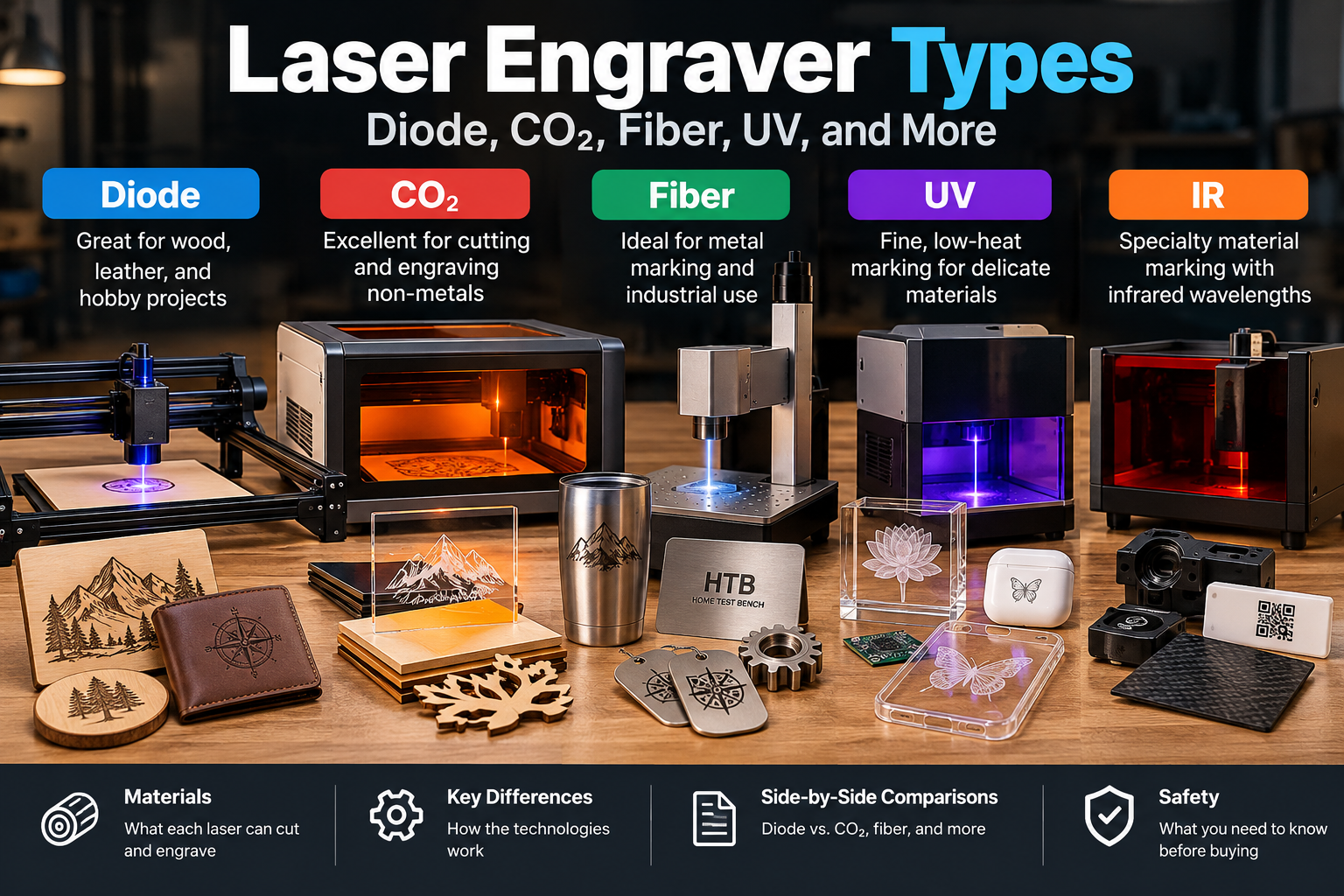
Laser Engraver Types at a Glance
The most common technologies you’ll encounter when shopping for a laser engraving machine are diode, CO₂, fiber, UV, and infrared (IR). However, these terms don’t all describe the same characteristic of a laser. Some describe the way the laser is generated, while others describe its wavelength.
| Technology | Typical Wavelength | Primary Strength | Common Applications |
|---|---|---|---|
| Blue Diode | ~445–455 nm | General engraving and light cutting | Wood, leather, paper, cardboard |
| CO₂ | ~10.6 µm | Cutting and engraving non-metals | Wood, acrylic, leather, plastics |
| Fiber | ~1,064 nm | Metal marking and engraving | Steel, aluminum, brass, titanium |
| IR | Varies | Specialty material marking | Depends on wavelength |
| UV | ~355 nm | Fine, low-heat marking | Plastics, glass, electronics, specialty materials |
Important: These aren’t completely interchangeable categories. Fiber describes a laser-source technology, while infrared describes a wavelength region. A typical fiber laser operates at an infrared wavelength. That’s why comparing “fiber vs. IR” isn’t really an apples-to-apples comparison.
The interaction between the laser’s wavelength and the material is one of the major reasons different laser technologies have such different strengths.
Wavelength vs. Laser Type: Why the Terminology Gets Confusing
One of the easiest ways to become confused when researching lasers is to see terms such as diode, fiber, blue, infrared, and ultraviolet and assume they’re all describing different types of machines in the same way.
They’re not.
Three characteristics are particularly useful to keep separate.
Laser source describes how the laser is generated. A diode laser uses semiconductor laser diodes, while a fiber laser generates its beam within a doped optical fiber.
Wavelength describes the portion of the electromagnetic spectrum where the laser operates. A blue diode laser commonly operates around 445–455 nanometers, while many fiber lasers operate around 1,064 nanometers in the infrared range. The FDA explains that laser products can emit visible, infrared, or ultraviolet radiation and that wavelength is one of the fundamental characteristics of laser light. U.S. Food and Drug Administration
Machine architecture describes how the laser is moved or directed across the workpiece. A gantry physically moves the laser head, while a galvo system uses rapidly moving mirrors to steer the beam.
These characteristics can overlap. A fiber laser can be an infrared laser, for example. Likewise, two machines using different laser sources can operate at wavelengths within the same general region.
Why does this matter? Because materials absorb different wavelengths differently. That interaction between the laser and the material is a major reason why one laser technology excels at wood while another excels at bare metal.
Diode Laser Engravers
Diode lasers are probably the most accessible type of laser engraver for hobbyists and makers. A typical blue diode machine uses semiconductor laser diodes to produce visible blue light, commonly around 445–455 nm. The technology allows manufacturers to build relatively compact machines without the laser tubes and optical systems used by many CO₂ machines.
The wavelength is a major part of what makes these lasers useful. Blue diode lasers are readily absorbed by many organic materials, making them particularly effective for wood, plywood, leather, cardboard, paper, cork, and similar materials. They can also mark some painted, coated, or anodized metals, although that doesn’t mean they can directly engrave ordinary bare metal like a fiber laser.
Higher-powered diode machines can cut suitable materials as well as engrave them. Thin plywood and other relatively thin materials are common applications, particularly when the machine has good focusing and air assist. Actual cutting performance varies substantially with material, thickness, laser power, focus, speed, and the number of passes.
What Makes a Diode Laser Different?
The biggest attraction of a diode laser is its combination of simplicity, relatively low cost, compact size, and useful material range.
The limitation is that the wavelength isn’t absorbed equally well by everything. Clear acrylic, for example, can be difficult for a typical blue diode because much of the visible light can pass through the material rather than being absorbed. Bare metals present another challenge.
That makes a diode laser an excellent starting point for someone interested primarily in wood, leather, signs, artwork, and general hobby projects, but not necessarily the best choice for every application.
Advantages of Diode Lasers
- Relatively affordable
- Compact compared with many CO₂ systems
- Generally low maintenance
- Excellent for wood and leather engraving
- Capable of cutting some thin materials
- Large selection of hobby-oriented machines
Limitations of Diode Lasers
- Limited ability to directly process bare metals
- Clear acrylic can be difficult
- Cutting capability is generally more limited than CO₂
- Performance varies considerably between machines
CO₂ Laser Engravers
CO₂ lasers work very differently from diode lasers. Instead of using semiconductor diodes to generate the laser directly, a CO₂ laser uses a gas-filled laser tube to produce infrared light, typically around 10.6 micrometers.
That much longer wavelength is strongly absorbed by many non-metallic materials. This makes CO₂ lasers particularly effective for wood, acrylic, leather, cardboard, rubber, fabrics, and many plastics.
One of the biggest advantages of a CO₂ laser is its ability to cut as well as engrave. For someone who wants to produce signs, boxes, templates, acrylic parts, or other fabricated objects rather than simply mark surfaces, a CO₂ machine can be a significant step up from a typical diode system.
CO₂ machines can also engrave large areas quickly. The tradeoff is that they tend to be larger and more expensive than entry-level diode machines, and traditional CO₂ systems can require more maintenance because of their tubes, mirrors, cooling systems, and optical alignment.
What Makes a CO₂ Laser Different?
The key difference isn’t simply that a CO₂ laser has more power.
Its wavelength is fundamentally different, and that wavelength is extremely effective at transferring energy into many non-metal materials. That’s why CO₂ lasers can cut acrylic so effectively while a typical blue diode laser may struggle with transparent acrylic.
CO₂ is therefore particularly attractive when cutting, speed, and broad non-metal material compatibility are more important than having the smallest or least expensive machine.
Advantages of CO₂ Lasers
- Excellent cutting capability
- Excellent for acrylic
- Excellent for wood and many other non-metals
- Fast engraving
- Available in larger work areas
- Well suited to production work
Limitations of CO₂ Lasers
- Generally larger than diode machines
- Higher initial cost
- Traditional systems require more maintenance
- Not the natural choice for direct bare-metal marking
Fiber Laser Engravers
Fiber lasers are where laser terminology becomes particularly interesting.
A fiber laser describes how the laser is generated, rather than simply describing its wavelength. The laser is generated within a doped optical fiber, commonly using ytterbium as the active element. Many fiber lasers used for marking and engraving operate around 1,064 nanometers, which is in the infrared portion of the spectrum.
That distinction is important because it means a fiber laser and an IR laser aren’t necessarily two separate alternatives. A typical fiber laser is itself an infrared laser.
The wavelength and beam characteristics of fiber lasers make them extremely effective at processing metals. They’re commonly used for marking and engraving stainless steel, aluminum, brass, copper, titanium, tools, jewelry, identification plates, and industrial components.
Depending on power and configuration, fiber lasers can do considerably more than simply change the color of a surface. They can produce permanent surface marks, annealing marks, and deeper engraving. High-power fiber systems can also cut metal, although those machines are considerably different from the compact fiber marking systems most hobbyists encounter.
What Makes a Fiber Laser Different?
The important difference is the combination of source technology, wavelength, beam quality, and power density.
Many metals absorb near-infrared laser energy very effectively. A fiber laser can therefore concentrate a large amount of energy into a very small area, producing highly detailed and permanent markings.
This is why comparing lasers by wattage alone can be misleading.
A 20W fiber laser isn’t simply a more powerful version of a 20W blue diode laser. They’re different technologies operating at different wavelengths and interacting with materials in very different ways. A comparison from Trotec similarly emphasizes that diode, CO₂, and fiber lasers have different strengths based on their materials and applications. Trotec Laser GmbH
What Are Fiber Lasers Best For?
Fiber is the technology to investigate if your primary applications involve:
- Bare-metal marking
- Deep metal engraving
- Tool identification
- Jewelry
- Stainless steel
- Aluminum
- Brass
- Titanium
- Industrial part marking
- Fine permanent markings
If most of your projects involve wood, leather, acrylic, or signs, a fiber laser is generally not the logical starting point.
IR Lasers
IR, or infrared, describes a range of wavelengths rather than a particular laser-source technology. That’s why it shouldn’t be treated as a direct competitor to fiber in the same way that diode and CO₂ are.
Many fiber lasers operate in the infrared portion of the spectrum, but some consumer machines also offer a separate IR laser module alongside a blue diode laser. These modules can use a different infrared wavelength to interact with materials differently than the machine’s visible blue diode.
The advantage is primarily material compatibility. Changing the wavelength can change how strongly a material absorbs the laser, allowing an IR source to process some materials that don’t respond particularly well to a blue diode.
However, “IR laser” isn’t specific enough by itself to tell you what a machine can do. When comparing an IR system, look at its actual wavelength, optical power, beam characteristics, and the materials the manufacturer has designed it to process.
What Makes an IR Laser Different?
The key difference is wavelength.
A blue diode laser and an IR laser can have similar optical power but produce very different results on the same material because the material absorbs the two wavelengths differently.
And because infrared radiation can be invisible to the human eye, you should never assume that an IR laser is safer simply because you can’t see the beam. The FDA specifically notes that some laser products emit invisible infrared or ultraviolet radiation. U.S. Food and Drug Administration
UV Laser Engravers
UV lasers operate at much shorter wavelengths than the visible blue diode lasers and infrared systems commonly used for engraving. A common UV wavelength is approximately 355 nm.
The shorter wavelength changes how the laser interacts with the material. UV lasers can remove material through processes with a greater photochemical component and can produce extremely fine marks while limiting the surrounding heat-affected area in many applications.
That makes UV particularly interesting for materials that can melt, discolor, or otherwise suffer from excessive heat.
UV lasers can be useful for:
- Plastics
- Glass
- Electronics
- Coated materials
- Fine-detail marking
- Specialty products
- Certain metals
- Heat-sensitive materials
What Makes UV Different?
The major difference is wavelength and material absorption.
A UV laser isn’t simply a more powerful diode or fiber laser. Its much shorter wavelength changes the way energy interacts with the target material, which can make it valuable when extremely fine or low-thermal-impact marking is required.
The downside is cost. UV systems are generally far more specialized and expensive than the diode machines most hobbyists encounter.
Diode vs. CO₂ Laser: What’s the Difference?
For someone shopping for a laser engraving machine, this is one of the most useful comparisons to understand.
Both diode and CO₂ lasers can work with materials such as wood and leather, but their strengths are different.
| Diode Laser | CO₂ Laser | |
|---|---|---|
| Wood engraving | Excellent | Excellent |
| Wood cutting | Good* | Excellent |
| Acrylic engraving | Limited to moderate* | Excellent |
| Acrylic cutting | Limited* | Excellent |
| Leather | Excellent | Excellent |
| Bare-metal marking | Limited | Limited |
| Machine size | Often compact | Often larger |
| Maintenance | Generally low | Generally higher |
| Cost | Lower | Higher |
| Best suited to | Hobby/maker work | Cutting + broader non-metal work |
*Performance depends heavily on the material, wavelength, power, optics, focus, and machine configuration.
If your main goal is engraving wood, leather, signs, and similar materials, a diode machine may be all you need.
If you want to cut thicker materials, work extensively with acrylic, or produce parts in a small business, a CO₂ laser may make considerably more sense.
Neither is universally better. They’re optimized for different jobs.
Fiber vs. Diode: Why They’re So Different
Fiber and diode lasers illustrate perfectly why wattage isn’t enough to compare laser machines.
A blue diode laser is generally well suited to organic materials such as wood because those materials absorb its wavelength effectively. A fiber laser commonly operates around 1,064 nm and can deliver extremely concentrated energy to metals that respond well to that wavelength.
The result is that a relatively modest fiber laser can produce detailed permanent markings on bare metal while a much higher-powered diode laser may struggle to do the same thing.
The question isn’t:
Which laser has more watts?
It’s:
Which laser interacts best with the material I want to process?
Laser Engraver vs. Laser Cutter
The terms laser engraver and laser cutter can make it sound as though you’re choosing between two completely different machines.
Often, you’re not.
Engraving and cutting are two different applications of the same basic laser technology. The FDA itself identifies tabletop consumer products as laser markers, cutters, or engravers, recognizing that the same general category of equipment can perform these different functions. Access Data
Engraving
During engraving, the laser removes or changes material at the surface without completely penetrating the workpiece.
Typical applications include:
- Text
- Logos
- Photographs
- Patterns
- Artwork
- Serial numbers
Cutting
During cutting, the laser delivers enough energy to completely penetrate the material, separating one piece from another.
Common laser-cut materials include:
- Wood
- Plywood
- Acrylic
- Cardboard
- Leather
- Certain plastics
- Some fabrics
Cutting ability depends on the laser technology, optical power, material, thickness, focus, speed, air assist, and number of passes.
Can a Laser Engraver Cut?
Absolutely.
Many machines marketed as laser engravers can also cut. A lower-powered diode machine might engrave beautifully and cut thin plywood, while a more powerful diode or CO₂ machine can cut substantially thicker material.
That’s why the name “laser engraver” doesn’t tell you the whole story.
When shopping, look at the machine’s actual cutting specifications rather than assuming that a machine labeled an engraver can’t cut.
Gantry vs. Galvo: How Does the Laser Move?
Laser technology isn’t the only thing that determines how a machine works. You’ll also encounter gantry and galvo systems.
These aren’t different laser sources. They describe how the beam is moved across the workpiece.
Gantry Machines
A gantry machine physically moves the laser head over the workpiece.
This is common on desktop diode and CO₂ machines.
Gantry systems are well suited to:
- Large work areas
- Signs
- Sheet materials
- General-purpose engraving
- Cutting
- Hobby and maker applications
Galvo Machines
A galvo system uses rapidly moving mirrors to steer the laser beam rather than physically moving the laser head across the entire work area.
This allows very fast marking over a relatively compact work area.
Galvo systems are particularly common with fiber lasers and are well suited to applications such as:
- Metal marking
- Tool identification
- Jewelry
- Industrial components
- High-speed production marking
If you’re making large wooden signs, a gantry machine is likely to be more useful.
If you’re marking small metal parts quickly, a galvo fiber system may be the better fit.
Why Laser Power Isn’t the Whole Story
One of the biggest mistakes new buyers make is assuming that more watts automatically means a better laser.
It doesn’t.
Power matters, but so do:
- Wavelength
- Beam quality
- Spot size
- Optics
- Focus
- Material
- Material thickness
- Cutting speed
- Number of passes
- Air assist
- Machine design
A 10W diode laser can be a better choice for a particular job than a much more powerful laser whose wavelength isn’t absorbed efficiently by that material. Likewise, a relatively modest fiber laser can outperform a much higher-powered diode laser when the job involves marking bare metal.
The same principle applies when comparing other maker equipment. Our 3D printer comparison looks at how different machines approach the same basic job from very different directions.
Think in terms of application, not just wattage.
Open-Frame vs. Enclosed Laser Engravers
Another important choice is whether to use an open-frame or enclosed machine.
Open-frame machines are popular because they’re often less expensive and provide easy access to the workpiece. They’re common among hobbyists, but the open design means the user has to pay particular attention to laser exposure, the operating environment, and access to the beam.
Enclosed machines place the working area behind a protective enclosure. Depending on the design and certification, an enclosure can help control access to hazardous laser radiation and can also make smoke and fume management easier.
The important point is that an enclosure isn’t merely a convenience feature. The laser’s classification, enclosure design, interlocks, shielding, ventilation, and operating procedures all matter.
Laser Safety Is Not Optional
Laser engraving machines aren’t ordinary power tools.
The potential hazard depends on the laser’s classification and design, but higher-powered lasers can present serious eye and skin hazards. The FDA recognizes laser hazard classes from Class I through Class IV, with the potential for injury increasing with the class. Class IIIb and Class IV systems can present immediate eye and skin hazards, while Class IV systems can also present a fire hazard. U.S. Food and Drug Administration
That means buyers should pay attention to more than the machine’s advertised engraving power. Look for appropriate safety labeling, enclosure design, interlocks, and other protective measures. The FDA also advises consumers to be cautious when purchasing laser products online and to look for appropriate certification and identification information. U.S. Food and Drug Administration
Ventilation is another important consideration. Laser cutting and engraving can produce smoke, fumes, and vapors depending on the material being processed. OSHA guidance specifically addresses ventilation for fumes and vapors produced by laser cutting and other target interactions. OSHA
Before operating any laser, understand:
- The laser’s classification
- Its wavelength and output
- Required protective equipment
- Whether the enclosure is appropriate
- Safety interlocks
- Ventilation requirements
- Fire precautions
- Which materials are appropriate to process
Never assume that laser safety glasses alone make an open-frame machine safe.
Which Laser Engraver Is Right for You?
The easiest way to narrow down the choices is to start with what you want to make, not which machine looks most impressive.
Choose a Diode Laser If…
You primarily want to:
- Engrave wood
- Make signs
- Engrave leather
- Create artwork
- Make personalized gifts
- Experiment with laser engraving
- Cut relatively thin materials
A diode laser is probably the best starting point.
Choose a CO₂ Laser If…
You want to:
- Cut wood
- Cut acrylic
- Produce signs
- Work with larger sheets
- Process a broad range of non-metal materials
- Engrave quickly
- Run a small production operation
A CO₂ laser is likely the better choice.
Choose a Fiber Laser If…
Your primary interest is:
- Metal engraving
- Tool marking
- Jewelry
- Stainless steel
- Aluminum
- Brass
- Titanium
- Industrial identification
- High-detail metal marking
Fiber is the obvious technology to investigate.
Choose a UV Laser If…
You have a specific need for:
- Fine-detail marking
- Specialty plastics
- Electronics
- Glass
- Heat-sensitive materials
- Precision applications
UV is worth investigating.
Consider IR If…
You’re working with a particular material that responds especially well to an infrared wavelength and you’ve already established that a conventional blue diode isn’t the best match.
For most beginners, IR isn’t where I’d start. It’s more useful when you have a specific application that justifies the additional capability.
Frequently Asked Questions
Can a diode laser engrave metal?
Some diode lasers can mark painted, coated, or anodized metals. Direct engraving of bare metal is much more limited. If regular bare-metal marking is your primary goal, a fiber laser is generally the more appropriate technology.
Can a CO₂ laser engrave metal?
CO₂ lasers aren’t generally the first choice for direct bare-metal engraving. They’re much better suited to wood, acrylic, leather, and other non-metal materials. Certain coated or treated metals can be marked with appropriate techniques.
Which is better, diode or CO₂?
Neither is universally better. A diode laser can be an excellent choice for hobby engraving and light cutting, while a CO₂ laser generally offers greater cutting capability and broader compatibility with non-metal materials such as acrylic.
Is a fiber laser better than a diode laser?
For bare-metal marking and engraving, generally yes. For wood, leather, and many common hobby materials, a diode laser is usually much more appropriate.
How many watts do I need?
That depends on what you’re trying to accomplish. Engraving generally requires less power than cutting, but the required power also depends on the material, thickness, wavelength, optics, focus, and desired speed.
Don’t choose a laser based solely on its wattage rating.
Can laser engravers cut wood?
Yes. Both diode and CO₂ lasers can cut wood. CO₂ systems generally provide greater cutting capability and speed, but the actual thickness depends on the laser, material, power, focus, speed, air assist, and number of passes.
Can laser engravers cut acrylic?
CO₂ lasers are particularly well suited to cutting acrylic. Some diode lasers can process certain acrylic materials, but transparent acrylic can be difficult for many visible-light diode systems because the material doesn’t absorb the wavelength effectively.
Do I need an enclosure?
For many higher-powered systems, proper enclosure and safety controls are extremely important. The exact requirements depend on the laser’s classification and design. An enclosure can also help with smoke and ventilation management.
Final Thoughts
The biggest mistake you can make when choosing a laser engraver is starting with the machine instead of the material.
Think about what you actually want to make.
If you’re interested in wooden signs, leather goods, artwork, and general hobby projects, a diode laser can be an excellent entry point.
If cutting wood and acrylic is important, a CO₂ laser can provide substantially more capability.
If your work revolves around metal, a fiber laser is usually the technology to investigate.
And if you have a specialized application involving delicate materials or extremely fine marking, UV or a suitable IR system may be worth considering.
The good news is that there isn’t one “best” laser engraver.
There’s simply a best type of laser for the job you want to do.
Once you understand the differences between laser source, wavelength, power, and machine design, shopping for a laser engraving machine becomes considerably easier—and you’re much less likely to spend money on a machine that isn’t suited to the materials you actually want to work with.