Disclosure: As an Amazon Associate, HomeTestBench earns from qualifying purchases.
Most multicolor 3D printers make a single nozzle do all the work. Every color change requires unloading one filament, loading another, and purging the previous material—a process that can add hours to complex prints while creating a surprising amount of plastic waste.
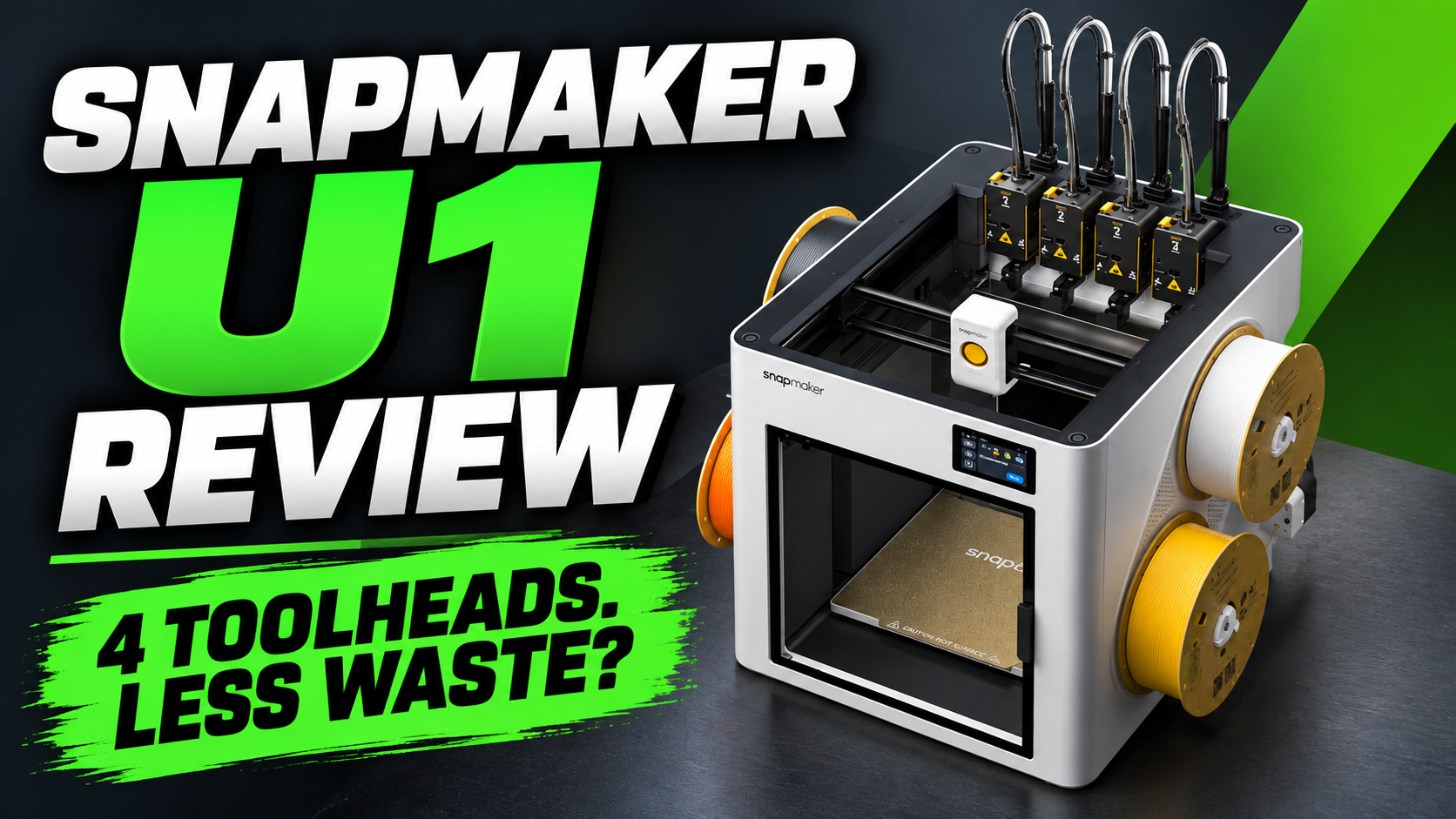
The Snapmaker U1 3D printer takes a very different approach. Instead of swapping filament through one nozzle, it uses four independent toolheads that can each remain loaded with a different material or color. In this Snapmaker U1 review, we’ll examine how well that approach works, along with print quality, speed, material compatibility, software, price, and reported problems to determine where the U1 makes sense—and where it may not.
How we evaluated the Snapmaker U1: HomeTestBench has not performed hands-on testing of this printer. Our evaluation is based on manufacturer documentation, published independent testing, firmware and support documentation, and owner experiences. Test results from third parties are identified and attributed to their original sources.
🏆 Quick Verdict
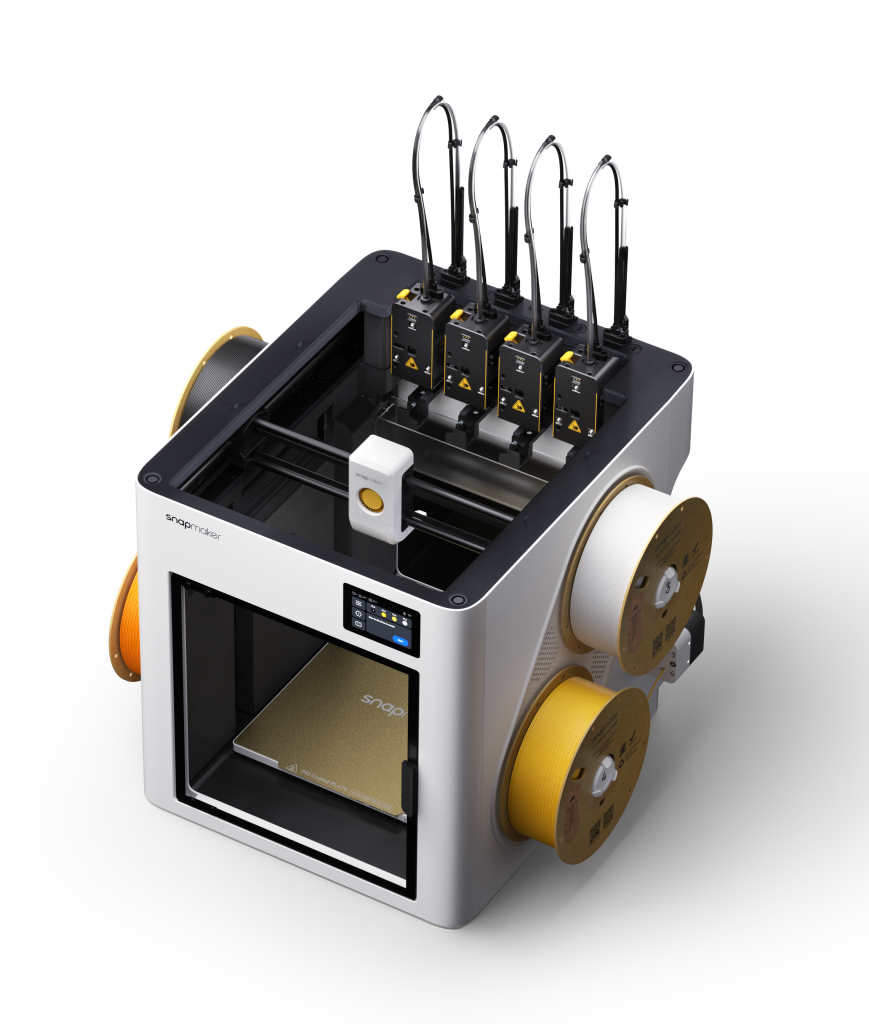
The Snapmaker U1 stands out from most multicolor 3D printers by using four independent toolheads instead of repeatedly loading and unloading filament through a single nozzle. That design can dramatically reduce color-change time and filament waste on complex multicolor prints while also opening up interesting possibilities for multi-material printing.
Based on published independent testing, manufacturer documentation, and owner experiences, the U1 delivers strong print quality and genuinely fast multicolor performance. However, its four-toolhead system adds complexity, and buyers should be aware of calibration requirements, evolving firmware, and reported tool-changing and filament-handling issues.
Our take: The U1 is one of the most compelling options for buyers who expect to print frequently in multiple colors or materials. Its biggest advantage becomes more significant as the number of tool changes increases. For primarily single-color printing, however, much of what makes the U1 special provides less benefit.
Table of Contents
Snapmaker U1 Specs
The Snapmaker U1 combines a relatively large build volume with a CoreXY motion system and four interchangeable toolheads. Here are the key specifications buyers should know.
| Specification | Snapmaker U1 |
|---|---|
| Printer Type | CoreXY with 4 independent toolheads |
| Build Volume | 270 × 270 × 270 mm |
| Toolheads | 4 interchangeable independent toolheads |
| Included Nozzles | 0.4 mm stainless steel |
| Maximum Nozzle Temperature | 300°C |
| Maximum Bed Temperature | 100°C |
| Maximum Print Speed | Up to 500 mm/s |
| Maximum Acceleration | Up to 20,000 mm/s² |
| Tool Change Time | Approx. 5 seconds |
| Automatic Bed Leveling | Yes |
| Supported Materials | PLA, PETG, TPU, PVA, PCTG* |
| Slicer | Snapmaker Orca |
| Connectivity | Wi-Fi, USB |
| Display | 3.5-inch touchscreen |
| Enclosure | Open-frame; optional Top Cover |
| Current MSRP | $999 |
| Current Sale Price | $849 at time of research |
Additional materials including ABS, ASA, PA and PC are supported with the optional Top Cover. Fiber-reinforced materials require the Top Cover and appropriate hardened-steel hotends. Material compatibility should be checked against Snapmaker’s current recommendations.
What Makes the Snapmaker U1 Different?
Most consumer multicolor 3D printers use a single hotend and automatically feed different filaments into that same nozzle. When the printer changes colors, it must retract the current filament, load the next one, and purge enough material to prevent the previous color from contaminating the new one. Repeat that process dozens—or hundreds—of times during a print, and the added time and wasted filament can become substantial.
The Snapmaker U1 approaches multicolor printing differently. It has four separate toolheads, allowing four colors or materials to remain loaded at the same time. When a change is required, the printer parks the active toolhead and picks up another rather than repeatedly unloading and reloading filament through a single nozzle.
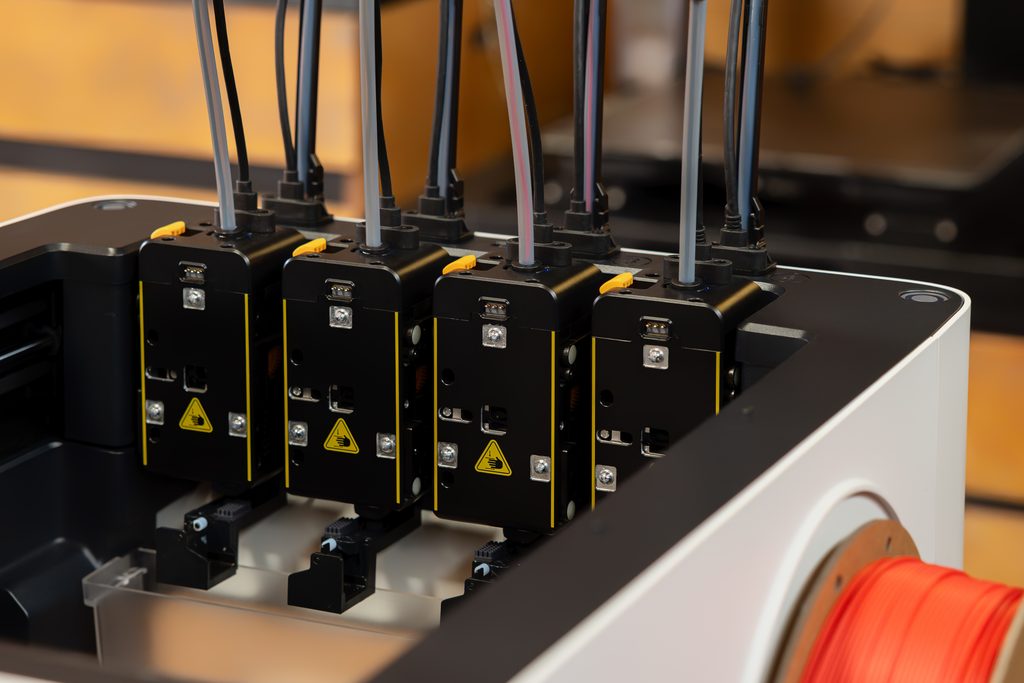
Snapmaker specifies a tool-change time of approximately five seconds. The U1 still uses a prime tower and performs nozzle-cleaning operations, so calling the system “zero waste” would be misleading. However, it can eliminate much of the purge material associated with conventional single-nozzle multicolor systems.
The advantage becomes increasingly important as the number of tool changes rises. A simple single-color print gains relatively little from having four toolheads. A complex multicolor model requiring dozens or hundreds of changes is where the U1’s architecture can make a much larger difference in both print time and material consumption.
Four Toolheads vs. Single-Nozzle Multicolor Systems
The biggest advantage of the U1’s tool-changing system shows up when a print requires frequent color changes. Each toolhead keeps its own filament loaded, so the printer avoids the lengthy unload, reload, and purge cycle required by many single-nozzle multicolor systems.
Independent testing by Tom’s Hardware illustrates the difference. In one test involving three-color figures and 90 color changes, the Snapmaker U1 completed the job about three hours faster than a Bambu Lab P1P and required only a 4-gram prime tower. In another same-settings PLA comparison, both printers produced excellent print quality with clean color separation, but the P1P took about two hours longer and consumed 25 grams more material through its filament-changing process. Tom’s Hardware
These results shouldn’t be interpreted to mean that the U1 is always dramatically faster than a conventional CoreXY printer. The advantage depends heavily on the model. With a single-color print, there may be relatively little difference. With dozens or hundreds of tool changes, however, the time savings can accumulate quickly.
Snapmaker itself advertises a 5-second mechanical tool swap and says its system can reduce waste by up to 85% compared with shared-nozzle filament switching under its test conditions. Those are manufacturer claims rather than independent measurements, but they help explain what the U1’s architecture is designed to accomplish. Snapmaker’s U1 product page
Multicolor and Multi-Material Printing
Multicolor printing is the most obvious reason to consider the Snapmaker U1, but having four independent toolheads offers another potential advantage: each toolhead can be configured for a different filament rather than simply a different color of the same material.
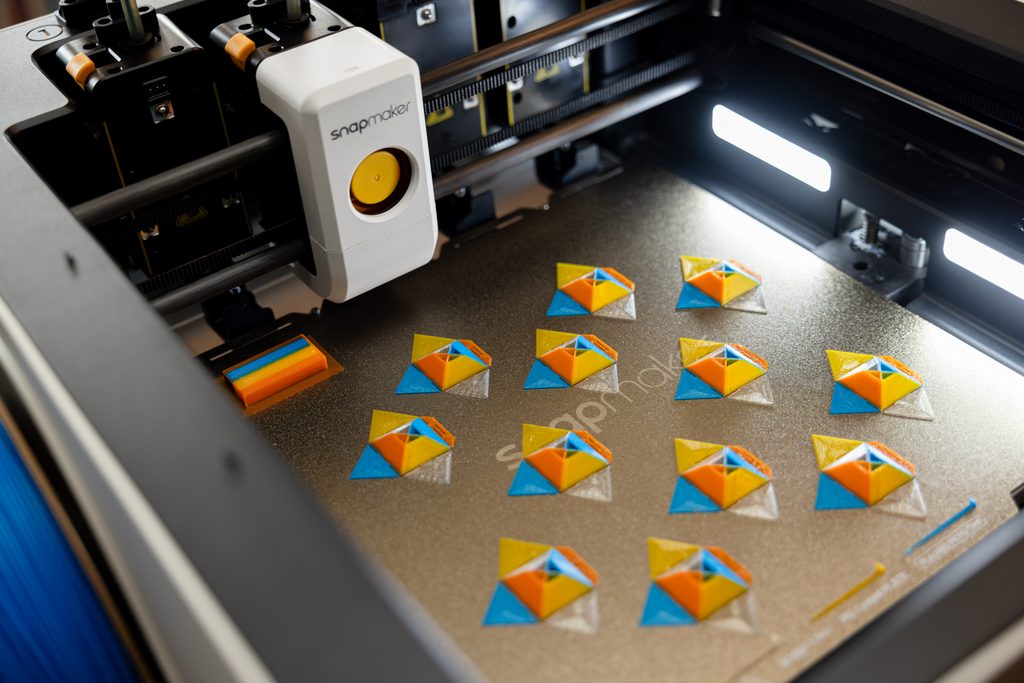
The U1 can keep four colors loaded simultaneously using its four independent toolheads. Image: SnapmakerFor decorative prints, that means four colors can remain loaded and ready without repeatedly feeding filament through a shared nozzle. For functional prints, the U1 can combine compatible materials within the same project—for example, using a separate material for supports or incorporating flexible elements into an otherwise rigid part.
Independent testing has demonstrated that the U1 can successfully combine different materials. Tom’s Hardware, for example, produced a two-color TPU print using separate toolheads. The ability to dedicate a nozzle to each material also avoids having both materials pass through the same melt zone, although successful multi-material printing still depends on factors such as bed temperature, nozzle temperature, material adhesion, and slicer settings.
There is also flexibility in how the four toolheads are configured. Users aren’t limited to four identical 0.4 mm nozzles forever; different compatible hotend/nozzle configurations can potentially be assigned to different tools for specialized printing. Abrasive fiber-filled filaments, however, require appropriate hardened components, and higher-temperature engineering materials may require the optional Top Cover.
Does the U1 Eliminate Filament Waste?
No. The U1 greatly reduces the large purge volumes associated with repeatedly switching filament through one nozzle, but it does not make multicolor printing completely waste-free. The printer still needs to clean and prime its toolheads, and multicolor jobs may use a prime tower to maintain consistent extrusion.
The important distinction is where the waste comes from. A shared-nozzle system may need to purge enough filament to clear the previous color from the melt zone every time filament changes. The U1 changes the entire toolhead instead, so most of that color-clearing purge is unnecessary. On prints involving many tool changes, that difference can become substantial.
Snapmaker U1 Print Quality and Performance
A clever tool-changing system would mean little if the printer couldn’t produce consistently good parts. Published testing of the Snapmaker U1 has generally found strong overall print quality, including good dimensional accuracy and clean registration between colors printed by different toolheads.
Tom’s Hardware reported clean multicolor results with good alignment between the U1’s separate nozzles, which is particularly important on a tool-changing printer. If the toolhead offsets aren’t calibrated accurately, transitions between colors or materials can show visible misalignment.
TechRadar also reported strong overall print quality and dimensional accuracy in its testing, while noting some weaknesses involving bridging and resonance. That distinction is worth keeping in mind: the U1 appears capable of excellent results, but its speed specifications shouldn’t be confused with a guarantee that every model should be printed at maximum speed.
As with other high-speed CoreXY printers, actual print quality depends on the model, filament, layer height, speed, acceleration, cooling, and slicer profile. For buyers primarily interested in the U1 for multicolor work, however, the independent results are encouraging because accurate alignment between four separate toolheads is one of the areas where this design has to perform well.
How Fast Is the Snapmaker U1?
Snapmaker rates the U1 for movement speeds of up to 500 mm/s and acceleration up to 20,000 mm/s², but maximum specifications don’t tell the whole story. Complex geometry, small layers, material limitations, cooling requirements, and quality settings can all prevent a print from spending much time at its theoretical maximum speed.
The more meaningful speed advantage is often the U1’s ability to avoid long filament-change cycles. On a single-color model, it competes as a fast CoreXY printer. On a multicolor model requiring frequent changes, its approximately five-second tool swaps can save time repeatedly throughout the job. The more tool changes a model requires, the more significant that advantage can become.
Snapmaker U1 Filament and Material Compatibility
The Snapmaker U1 has a maximum nozzle temperature of 300°C, but nozzle temperature alone doesn’t determine which materials a printer is well suited to handle. The U1 is an open-frame printer in its standard configuration, which matters when printing materials that benefit from a controlled, warmer environment.
In its standard configuration, Snapmaker officially lists support for PLA, PETG, TPU, PVA, and PCTG. That covers the materials many users will print most often and gives the U1 useful options for both rigid and flexible parts as well as soluble-support applications.
Adding Snapmaker’s optional Top Cover expands the company’s recommended material range to include PET, ABS, ASA, PA (nylon), and PC (polycarbonate). These materials are more sensitive to drafts and temperature changes, making an enclosed or more controlled printing environment particularly useful for larger parts.
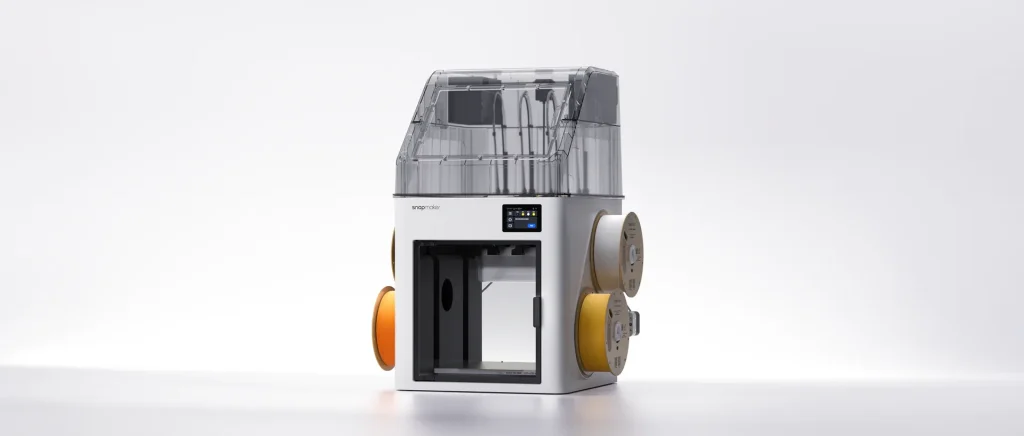
Snapmaker's optional Top Cover provides a more controlled printing environment for materials such as ABS, ASA, nylon, and polycarbonate. Image: SnapmakerBuyers interested in abrasive carbon-fiber- or glass-fiber-filled materials should also consider nozzle construction. Snapmaker recommends appropriate hardened-steel hotends along with the Top Cover for these materials because abrasive fibers can rapidly wear conventional nozzles.
This makes the U1 potentially capable of considerably more than decorative four-color PLA printing, but some of its more advanced material capabilities require additional hardware. Buyers planning to print ABS, ASA, nylon, polycarbonate, or fiber-reinforced engineering materials should factor those upgrades into the total cost.
Can the Snapmaker U1 Print ASA and ABS?
Yes, but with an important qualification. Snapmaker lists ABS and ASA among the supported materials when the U1 is equipped with the optional Top Cover. Independent reviewers have successfully printed some higher-temperature materials without it, but that doesn’t change the manufacturer’s recommended configuration.
For occasional small parts, users may have success under favorable conditions without a cover. For larger ABS or ASA parts where warping and layer adhesion become more challenging, buyers should consider the Top Cover part of the intended setup rather than assuming the open-frame U1 will behave like a fully enclosed printer.
Snapmaker U1 Software and OrcaSlicer
The Snapmaker U1 uses Snapmaker Orca, a slicer based on the popular open-source OrcaSlicer platform. That’s a positive starting point for users already familiar with modern 3D-printing software because the workflow and many of the controls will feel familiar rather than requiring an entirely proprietary slicing environment.
The slicer handles the U1’s four-toolhead configuration, allowing users to assign colors or materials to individual tools and prepare multi-tool prints. This is particularly important on the U1 because the software has to coordinate not only normal print settings but also tool changes, priming, nozzle assignments, and offsets between four physically separate hotends.
Snapmaker has continued updating both the U1’s firmware and software since launch. That ongoing development has brought improvements and bug fixes, but it also means the platform is still evolving. Firmware updates can occasionally require users to repeat calibration procedures; for example, Snapmaker’s September 2026 firmware V2.0.0 instructions call for multi-toolhead offset calibration and heated-bed leveling after updating.
For most users, this shouldn’t make the U1 unusually difficult to operate, but the four-toolhead design inevitably introduces more calibration variables than a conventional single-hotend printer. Accurate toolhead offsets are particularly important because even a small alignment error can become visible where different tools contribute to the same printed part.
Does the Snapmaker U1 Work With OrcaSlicer?
The U1’s primary slicing environment is Snapmaker Orca, which is based on OrcaSlicer. That gives users an Orca-style workflow while incorporating the profiles and multi-tool functionality needed specifically for the U1. Users should keep the slicer and printer firmware reasonably current, especially when Snapmaker releases fixes related to calibration, tool changing, or filament handling.
Snapmaker U1 Price and Value
The Snapmaker U1 price is one of the strongest arguments in its favor. At the time of this review, Snapmaker lists the U1 from $849, compared with a regular listed price of $999. Because promotions can change, buyers should check current pricing rather than assume the sale price will remain available.
At that price, the U1 offers something unusual: a four-toolhead system in a consumer-level machine. Its value proposition is strongest for users who will actually take advantage of multicolor or multi-material printing, where faster tool changes and reduced purge waste can provide benefits on print after print.
For someone who primarily produces single-color PLA or PETG parts, the calculation is different. The U1 remains a capable CoreXY printer, but much of what you’re paying for—the four toolheads, docking system, multi-tool calibration, and associated hardware—provides less benefit if tool changes rarely occur.
Buyers interested in engineering materials should also consider the cost of accessories. Snapmaker currently lists the optional Top Cover at $149, and hardened-steel hotends are an additional expense for abrasive fiber-filled materials. A U1 configured for more demanding materials can therefore cost more than the base printer price suggests.
Is the Snapmaker U1 Worth It?
The answer depends largely on what you plan to print. For frequent multicolor printing, multi-material projects, soluble supports, or designs requiring many tool changes, the U1’s architecture offers tangible advantages that conventional single-nozzle multicolor systems cannot completely replicate.
If most of your printing will be single-color models, however, the U1’s defining feature becomes much less important. In that case, buyers should compare it with other CoreXY printers based on print quality, build volume, enclosure, software, reliability, and price rather than choosing it primarily for the tool changer.
In other words, the U1 makes the strongest case for itself when tool changing is something you’ll actually use, not simply a feature that looks impressive on the specification sheet.
Snapmaker U1 Problems and Potential Drawbacks
No 3D printer is trouble-free, and the U1’s four-toolhead architecture introduces mechanical and calibration considerations that don’t exist on a conventional single-hotend machine. Owner experiences vary considerably, so reported problems shouldn’t automatically be interpreted as defects affecting every U1. However, there are several recurring areas prospective buyers should know about.
Toolhead picking and parking errors: Snapmaker’s own troubleshooting documentation includes procedures for problems involving toolhead pickup, parking, and detection. Firmware updates have also specifically addressed homing and toolhead docking behavior. This doesn’t establish how frequently these problems occur, but it confirms that Snapmaker has encountered and documented them.
Calibration between toolheads: Four separate nozzles must remain accurately aligned so different tools can contribute to the same print without visible offsets. Moving the printer, changing hardware, or installing certain firmware updates may require recalibration. This is an additional maintenance consideration compared with a single-hotend printer.
Filament loading and extrusion issues: Snapmaker’s support documentation and owner reports include cases involving filament detection, loading, extrusion, and clogged hotends. These aren’t unique problems in 3D printing, but having four independent filament paths means the U1 has more components that may occasionally require attention.
Software and firmware maturity: Snapmaker has continued releasing fixes and improvements since the U1’s introduction. That’s encouraging from a support standpoint, but it also indicates that the platform continues to mature. Buyers who want an appliance-like experience may be less tolerant of occasional recalibration or troubleshooting than enthusiasts who are comfortable maintaining a 3D printer.
Open-frame design: The standard U1 isn’t fully enclosed. PLA and PETG users may not care, but buyers planning significant ABS, ASA, nylon, or polycarbonate printing should account for the optional Top Cover when comparing the U1’s price with enclosed competitors.
Are Snapmaker U1 Owners Having Reliability Problems?
Owner reports don’t support a simple yes-or-no answer. Some U1 owners report hundreds of hours of successful printing with few tool-changing problems, while others describe repeated docking, filament-feeding, clogging, communication, or calibration issues. Online reports are useful for identifying the types of problems that can occur, but they can’t tell us what percentage of U1 printers experience them.
For that reason, we wouldn’t characterize the U1 as either universally unreliable or trouble-free based on anecdotal reports alone. The more defensible conclusion is that its additional mechanical complexity creates more potential troubleshooting points than a simpler single-tool printer, while many owners appear to be using the system successfully.
Pros and Cons
Pros
- Four independent toolheads enable very fast color changes
- Far less purge waste than typical single-nozzle multicolor systems
- 270 × 270 × 270 mm build volume
- Strong multicolor print quality in independent testing
- Up to 500 mm/s advertised print speed
- Supports multi-material printing
- Snapmaker Orca is based on the familiar OrcaSlicer platform
- Competitive price for a four-toolhead printer
Cons
- Four-toolhead system adds mechanical and calibration complexity
- Standard printer is not fully enclosed
- Top Cover needed for Snapmaker’s official ABS, ASA, nylon, and PC support
- Hardened hotends required for abrasive fiber-filled materials
- Toolhead docking and filament-handling problems have been reported
- Firmware and software are still evolving
- Benefits are less significant for primarily single-color printing
- More potential maintenance points than a single-hotend printer
Who Should Buy the Snapmaker U1?
The Snapmaker U1 makes the most sense for users who will regularly take advantage of its four independent toolheads. Its biggest strengths become increasingly valuable as prints require more colors, materials, or tool changes.
The U1 is particularly well suited for:
- Frequent multicolor printing: Complex models with many color changes benefit most from the U1’s fast tool-changing system and reduced purge waste.
- Multi-material projects: Separate toolheads make it possible to keep different compatible materials loaded without repeatedly feeding them through the same nozzle.
- Soluble or specialized supports: A dedicated toolhead can be assigned to support material while the remaining tools handle the primary print materials.
- Functional printing: The 270 × 270 × 270 mm build volume, 300°C hotends, and optional Top Cover give the U1 capabilities beyond decorative PLA models.
- Users frustrated by purge waste: Anyone who regularly runs multicolor prints on a shared-nozzle system may find the U1’s approach especially appealing.
The U1 is also an interesting choice for experienced 3D-printing enthusiasts who like experimenting with different nozzle, filament, and material combinations. Four independently controlled tools provide possibilities that aren’t practical with a conventional single-hotend printer.
Who Should Skip the Snapmaker U1?
The U1 isn’t automatically the best choice simply because four toolheads are technologically impressive. Buyers who rarely use them may be paying for complexity that provides little practical benefit.
Consider another printer if:
- You expect to print almost exclusively in a single color.
- You want a fully enclosed printer without purchasing additional hardware.
- Your priority is the simplest possible ownership and maintenance experience.
- You aren’t comfortable occasionally calibrating or troubleshooting a more mechanically complex system.
- You primarily need a basic printer for PLA and PETG and don’t expect to use multi-material capabilities.
In those situations, a simpler CoreXY printer may provide comparable everyday print performance with fewer components to maintain.
If you don’t need independent toolheads, our 3D printer comparison looks at three more conventional alternatives at different price points.
Snapmaker U1 Alternatives
The U1’s four-toolhead design makes it unusual in its price range, but it isn’t the only option for buyers interested in fast multicolor or multi-material printing. The best alternative depends on whether you prioritize simplicity, enclosure, build volume, material flexibility, or independent toolheads.
Bambu Lab P2S Combo
The Bambu Lab P2S Combo is a strong alternative for buyers who prefer a more conventional automated multicolor system and an enclosed printer. Rather than using four independent toolheads, Bambu’s AMS-based approach feeds multiple filaments through the printer’s hotend. That can mean longer color changes and more purge waste, but it offers a different balance of automation, enclosure, and ecosystem integration.
For another look at Bambu’s enclosed multicolor options, see our Bambu Lab P1S Combo comparison
Prusa XL
The Prusa XL is the more direct conceptual alternative because it can also use multiple independent toolheads. Its larger build volume and established tool-changing platform make it attractive for demanding multi-material work, but it occupies a substantially higher price class than the U1. For buyers specifically interested in independent-toolhead printing, however, it is an important comparison.
Bambu Lab H2D
The Bambu Lab H2D targets a higher-end segment with a larger build volume, enclosed design, and broader fabrication capabilities. It costs considerably more than the U1, but buyers considering the U1 for advanced engineering materials or more demanding production work may reasonably cross-shop the two.
For buyers focused primarily on multicolor printing, the most important distinction is architectural: the U1 changes toolheads, while many competing systems change filament through a shared hotend. Neither approach is automatically better for every user; the advantage depends heavily on the types of prints you plan to produce.
Snapmaker U1 FAQ
Is the Snapmaker U1 fully enclosed?
No. The standard Snapmaker U1 is an open-frame printer. Snapmaker offers an optional Top Cover for materials that benefit from a warmer, more controlled printing environment, including ABS, ASA, nylon, and polycarbonate.
How many colors can the Snapmaker U1 print?
The U1 has four independent toolheads, allowing four colors or materials to remain loaded simultaneously. Unlike systems that repeatedly feed different filaments through one shared nozzle, the U1 changes the entire toolhead when switching between them.
Does the Snapmaker U1 waste filament when changing colors?
Yes, but generally much less than a conventional shared-nozzle multicolor system. The U1 still performs nozzle cleaning and priming and may use a prime tower, but it doesn’t normally need to purge large amounts of filament simply to clear the previous color from a shared melt zone.
Can the Snapmaker U1 print TPU?
Yes. TPU is included among Snapmaker’s officially supported materials for the standard U1. The independent toolheads can also make flexible-material projects particularly interesting because TPU can remain loaded in a dedicated tool rather than sharing a nozzle with another material.
Can the Snapmaker U1 print ABS and ASA?
Yes, with the appropriate configuration. Snapmaker officially lists ABS and ASA support when the optional Top Cover is installed. Although users may successfully print some parts without it, the Top Cover is the manufacturer’s recommended configuration for these materials.
Does the Snapmaker U1 use OrcaSlicer?
The U1 uses Snapmaker Orca, which is based on OrcaSlicer and includes profiles and functionality specifically for the U1’s multi-toolhead system.
How fast does the Snapmaker U1 change toolheads?
Snapmaker specifies an approximately five-second mechanical tool change. The total time added to a print can vary because cleaning, priming, travel, and other operations may also occur around a tool change.
Is the Snapmaker U1 good for single-color printing?
Yes, but single-color printing doesn’t take advantage of the feature that most clearly distinguishes the U1. It remains a fast CoreXY printer with a useful 270 × 270 × 270 mm build volume, but buyers who rarely print in multiple colors or materials should also compare simpler printers that don’t carry the added complexity of four toolheads
🏁 Final Verdict
The Snapmaker U1 brings a genuinely different approach to consumer multicolor 3D printing. Instead of repeatedly loading and unloading filament through a shared nozzle, its four independent toolheads allow colors or materials to remain loaded and ready. On prints involving frequent tool changes, that design can significantly reduce both printing time and filament waste.
Published independent testing also suggests that the U1’s unusual architecture isn’t coming at the expense of print quality. Multicolor alignment has been strong, overall print quality has been good, and the 270 × 270 × 270 mm build volume gives it enough capacity for substantially more than small decorative models.
There are tradeoffs. Four toolheads introduce additional calibration and mechanical complexity, the standard U1 isn’t fully enclosed, and Snapmaker’s firmware and software continue to evolve. Buyers interested in ABS, ASA, nylon, polycarbonate, or abrasive engineering filaments should also account for the cost of the Top Cover and, where required, hardened hotends.
At its current $849 promotional sale price, however, the U1 offers an unusual amount of multi-tool capability for the money. For someone who regularly prints in multiple colors or materials, the four-toolhead system addresses two of the biggest disadvantages of conventional multicolor printing: slow filament changes and excessive purge waste.
Bottom line: The Snapmaker U1 makes the strongest case for buyers who will actually use its four-toolhead system. Primarily single-color users have less reason to accept the additional complexity, but frequent multicolor and multi-material users should have the U1 on their shortlist.
Check Snapmaker U1 Price on Amazon
2 thoughts on “Snapmaker U1 Review: Is This 4-Toolhead 3D Printer Worth It?”
Comments are closed.